


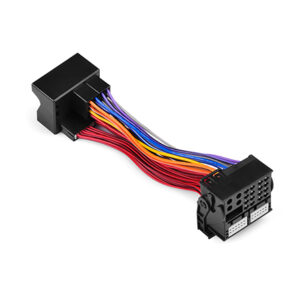
 1:1 Quadlock 40 Pin Plug Extension Cable Adapter
Shop

Car Video Interface For Mercedes-Benz NTG4
$ 252.00
ㆍModel Name : BZL-ECS06-NTG4
ㆍVideo interface for settop NAVI box installation.
ㆍAvailable with M2C-200IW Android Box.
ㆍCompatible with Mercedes-Benz NTG4.
Required Products
- (Android Box) M2C-200IW →
- (Video Interface) BZL-ECS06-NTG4 →
- (Touch) Original Touch System, or, Touch Panel → / Capacitive or Resistive Touch Panel


- 2006년 이후 출고된 Mercedes-Benz NTG4.0 모델에 적용 (벤츠 사각 LVDS 10핀 차량)
- NAVI (HDMI) INPUT 지원 – 안드로이드 셋탑 연결
- 외부 후방카메라 또는 옴니뷰 입력 지원 (고정 주차라인)
- 순정화면과 네비게이션의 PIP 기능 지원
- 차량 순정 버튼으로 화면전환
- Compatible with 2006~ Mercedes-Benz NTG4.0 models with the Benz Square 10-pin LVDS.
- 1 x NAVI (HDMI) INPUT – Connected to M2C Android Box.
- Possible to external rear camera connection. (With Fixed line)
- PIP function of original screen and navigation screen.
- Change screen mode through car original buttons.

CAR COMPATIBILITY SHEET
| Car Models | Production Year | LVDS TYPE |
|---|---|---|
| C-Class | 2008 – 2011 | Benz Square 10-pin LVDS Type |
| E-Class | 2009 – 2011 | Benz Square 10-pin LVDS Type |
| S-Class | 2006 – 2009 | Benz Square 10-pin LVDS Type |
PACKAGE COMPONENTS

1. Video Interface

2. Power&CAN Cable

3. LVDS Cable

4. Multi Power Output

5. Rear IN Cable
PRODUCT INFORMATION


PORTS – TOP
- UART
- PGIO (Not Used)
- Dip Switch (딥 스위치)
- Mode
- LED

PORTS – TOP
- Power&CAN1 (전원케이블) (7-PIN ▶ 1.B+ / 2.GND / 3.CAN-H / 4.CAN-L / 5-6.Not Used)
- IR
- CAN2 I/F 12V OUT
- RGB IN
- NAVI HDMI (Android Box IN)
- VDS OUT TOUCH
- LVDS IN
딥스위치 셋팅 (DIP switch setting)
 S-Calss (2006~2009) Europe |
 S-Calss (2006~2009) Japan |
 E-Calss (2009~2011) |
 C-Calss (2008~2011) |
순정 버튼으로 화면전환 (Switch screen mode via original buttons)

* (E, C-Class) When the ‘PIP Display’ is ‘Yes’. (Default) (OSD Set → PIP Display Menu)
<CLR> Button :
짧게 : PIP ON/OFF Short press : PIP ON/OFF PIP가 표시된 후 길게 : 두 영상 쌍방 전환 Long press after PIP displayed. : Videos 1:1 change.
<BACK> Button :
길게 : 네비 화면 전환 Long press : Switch screen to Android. 짧게 : 순정 화면 전환 Short press : Switch screen to OEM Original Mode.
<CLR / BACK> 동시에 길게 Long press together :
PIP 화면 이동 PIP Position * 전방/옴니뷰 활성시에는 카메라 뷰 타입 설정 * Set the camera view type when the front camera or omni-view is active.
* (E, C-Class) When the ‘PIP Display’ is ‘No’. (OSD Set → PIP Display Menu)
<CLR> Button :
순정 화면 전환 Switch screen to OEM Original Mode.
<BACK> Button :
길게 : 네비 화면 전환 Long press : Switch screen to Android. 짧게 : 순정 화면 전환 Short press : Switch screen to OEM Original Mode.

* (S-Class) When the ‘PIP Display’ is ‘Yes’. (Default) (OSD Set → PIP Display Menu)
<DISC/RADIO> Button :
길게 : PIP ON/OFF Long press : PIP ON/OFF 짧게 : PIP OFF시 순정 전체 화면 전환 Short press : When PIP is off, switch screen to full OEM Mode.
<BACK> Button :
길게 : PIP 포지션 이동 Long press : PIP position set. 짧게 : PIP OFF시 순정 전체 화면 전환 Short press : When PIP is off, switch screen to full OEM Mode.
<SEAT> Button :
PIP OFF시 순정 전체 화면 전환 When PIP is off, switch screen to full OEM Mode.
<TEL/NAV> Button :
네비 화면 전환 Switch screen to Android.
* (S-Class) When the ‘PIP Display’ is ‘No’. (OSD Set → PIP Display Menu)
<DISC/RADIO> Button :
순정 화면 전환 Switch screen to OEM Original Mode.
<BACK> Button :
순정 화면 전환 Switch screen to OEM Original Mode.
<SEAT> Button :
순정 화면 전환 Switch screen to OEM Original Mode.
<TEL/NAV> Button :
네비 화면 전환 Switch screen to Android.

Installation
M2C Android Box Car PC Navigation


▶ Product Name : BZL-ECS06-NTG4
본 컨텐츠의 저작권은 인디웍에 있으며, 가맹 계약된 제휴점에 제공되는 유료 컨텐츠입니다.

| Weight | 600 g |
|---|
![[정전식/Capacitive] 7-inch Touch Panel](https://indiwork.co.kr/wp-content/uploads/2018/07/c_touch_7_timg-300x300.jpg)
![[LINE FRIENDS] Micro 5-Pin Cable (Brown, Sally, Cony) 마이크로 5핀 케이블](https://indiwork.co.kr/wp-content/uploads/2018/03/line_5pin_cable_timg-300x300.jpg)
![[정전식/Capacitive] Benz E220D(W213) Touch Panel](https://indiwork.co.kr/wp-content/uploads/2017/02/benz_w213_e220d_b_timg-300x300.jpg)
![[HD-LINK] IW-H-NR For Sonata New Rise (쏘나타 뉴라이즈)](https://indiwork.co.kr/wp-content/uploads/2017/07/iw-h-nr_timg-300x300.jpg)
Reviews
There are no reviews yet.